01
Pick their next possibilities
Filter your catalog and choose the homes you'd recommend for this client.
Keep your client's attention on the homes you recommend—and the conversation with you. Your own page. No competing agents. Zero distractions.

Filter your catalog and choose the homes you'd recommend for this client.
Give your recommendations a home of their own, with your name on it.
One place to explore every home. Easy to open, easy to come back to.
Found a better match? Update their list. The link in their messages still works.
Give clients a place to remember you. Your profile, your catalog, and your contact details come together in a polished page that feels like your business.
monicacosta.correctify.comCreate your page
You chose the homes. Stay part of the conversation. Clients can explore the photos, review the details, and request a tour with you—all without leaving your page.
Build your catalog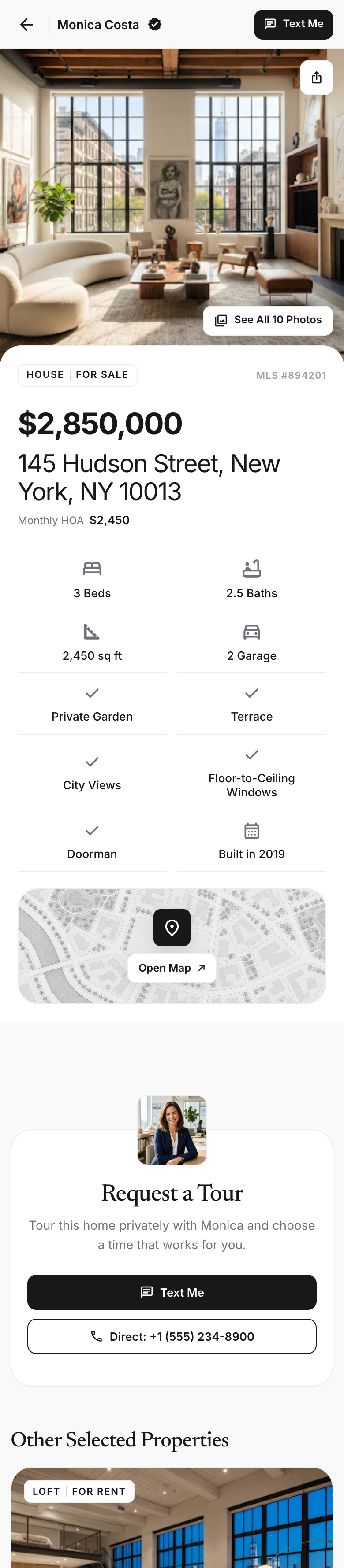
Skip the string of links and the “which home was that?” messages. Bring your listings together, make your selection, and send a page worth exploring.
Import from listing links, MLS information, or PDFs. Give properties from different sources the same professional presentation.
Create a different list for each client. Show them a thoughtful selection that reflects what they've told you.
Share one link by text or email. Clients can explore the options and reach you when they're ready for a closer look.
Every Correctfy property opens inside an experience you control. Your recommendations stay clear, your identity stays present, and the next conversation comes back to you.
Create your accountNo competing contact cards or calls to action pulling your client toward another professional.
Clients see the properties you selected—not an endless feed designed to send them somewhere else.
No banners, sponsored placements, or portal noise between the property and your guidance.
A professional catalog and personal client lists on every plan. Choose the space you need.
For agents building their first focused catalog.
For active agents who need their entire catalog ready to share.
A few answers about your page and your clients' experience.
Yes. Import from listing links, MLS information, PDFs, or property documents to build your catalog.
Both. Your own page presents your catalog under your name. From that catalog, you can create separate lists with just the homes you've chosen for each client.
Yes. Select properties from your catalog and create a personalized list with its own link. You can include the same property in multiple client lists.
No. Add or remove properties anytime. The same link opens the updated selection.
Try Pro for 14 days, with up to 100 properties and unlimited curated client lists.
No. Your page keeps your properties, your brand, and your contact information in focus. There are no ads or links to competing agents.
From the first link to the next showing, give clients a clear place to explore your recommendations—and find you.
Turn the property information you already have into listings ready to present.
Your own page brings your profile and catalog together in one recognizable destination.
Make each client feel considered with a list built around their search.
Add a new home or remove an old match. Clients return to the same link for the latest selection.
Keep the next question or tour request connected to you on every property page.
Big photos, clear details, and a simple mobile experience they can explore anywhere.

Make your next link your own.
Put your name behind every recommendation. Create your page, build a client list, and share it with confidence.Create your account